Tapping on my desk

Posted by philbuk on Apr 14th, 2008

This diagram shows a patent application recently filed by Apple for an OS X gesturing control panel.
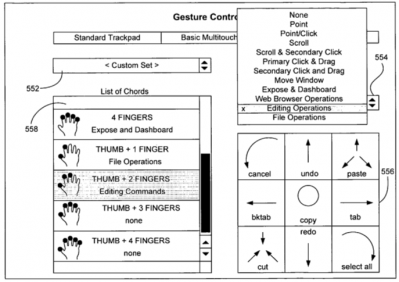
Apple gesture interface control panel patent

Thanks to macRumours.com

Apple are leading the pack in gestural interface design at the moment, with iPhone, iPod and Macbook Air. (But synaptics, who make most of the the worlds touchpads, are in hot pursuit. They say they expect that "80 to 90 percent of consumer notebooks will have these new multigestures by the end of the year.")

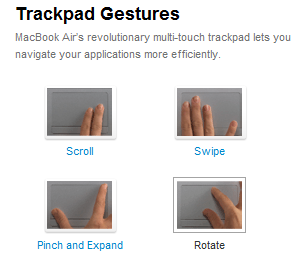
Sme of Apple MacBook Air's trackpad gesture

I've found myself sitting at my desk "trying out" these gestures. Would the three-finger paste gesture, above, be easier than the gesture I already use for pasting - Ctrl-V? Note that typing Ctrl-V is a gesture in itself. And when you're well trained using a QWERTY keyboard it's pretty easy to remember and perform.

Try it yourself. Tap on the desk. What do you think?

I wasn't sure at first, but on balance, I think Apple's gesture for paste is better than Ctrl-V.

Designing the right gesture

What makes touchpad gestures better than key combinations?

  • The most valuable gestures seem to encompass "degree" - not just "zoom in" but "zoom in this much".
  • But even for a binary operation like paste or cut, a gesture can be simpler, more comfortable and slightly more memorable than a keyboard shortcut, if it's chosen to match an analogous real-world action. It will be easier to use if it's closer to what our caveman brains evolved to cope with.
  • The position of the touchpad itself might also play an important role. I find myself wanting to throw out my mouse but keep a modified the mouse mat - a multitouch version connected to my computer. With my left hand on the keyboard and my right hand on the mat, I could mix keystrokes and gestures very comfortably.

New book on gestures

Dan Saffer of Adaptive Path is working on a book called "Interactive gestures: Designing gestural interfaces." He points out the importance of well-designed gestures. They must be comfortable to perform once or several times. And they mustn't embarrass the gesturer, or inconvenience people nearby.

The first chapter is available for free and is a good read. There's also a blog and a wiki.

4 Responses

  1. AJ Kock Says:

    Do you think that touchpads will increase in size or would it move towards touch screens, as people are already struggling to work on the current touchpads with one finger?

  2. philbuk Says:

    Apple are already increasing the size of their touchpads to make gestures easier. You definitely need bigger touchpads to do the job.
    I think that Apple have deliberately avoided the touch screen thing for the notebooks. Here's why.

    The shape of a traditional notebook computer is quite good, in many respects. It suits human beings well for fast, quiet data entry and for reading. Looking down at papers on your desk all days is bad for your neck. The tablet PC format, with it's draw-on screen, hasn't been a huge hit. And touch typing on a Jeff Han/Minority Report style perpendicular screen sounds very uncomfortable.

    So if I'm using a nice comfy notebook, having to reach out and touch a perpendicular screen isn't quick or easy. Things at the level of the desk surface are much easier.

    A bigger rethink of shape of personal computers might be required before you can whole-heartedly adopt touchscreens for personal, everyday use. Maybe it can't be done at all. Hmmm.

  3. Anne-Sophie Says:

    This is pretty interesting, thanks for sharing.

    I also found myself trying the signs for cutting, pasting etc...

    I would have thought undo was a bar to the left, as in going back in time, whilst cancel was more of a cross or a diagonal crossing line...

    It is interesting to see how icons and visual representations of these actions are influencing my brain and my guts whilst gesturing :)

    What does the second hand do on a laptop whilst the first hand moves?

  4. AJ Kock Says:

    A person on Youtube modded his EEE PC with a touch screen and because of the screen design, he was also able to flip it over onto the screen, flip the visual and then use his touch screen like you would usually use a laptop with keyboard down.

    Will this solve the problem of working with touch screens?

    Will try to find that clip again.

Leave a Comment

Please note: Comment moderation is enabled and may delay your comment. There is no need to resubmit your comment.